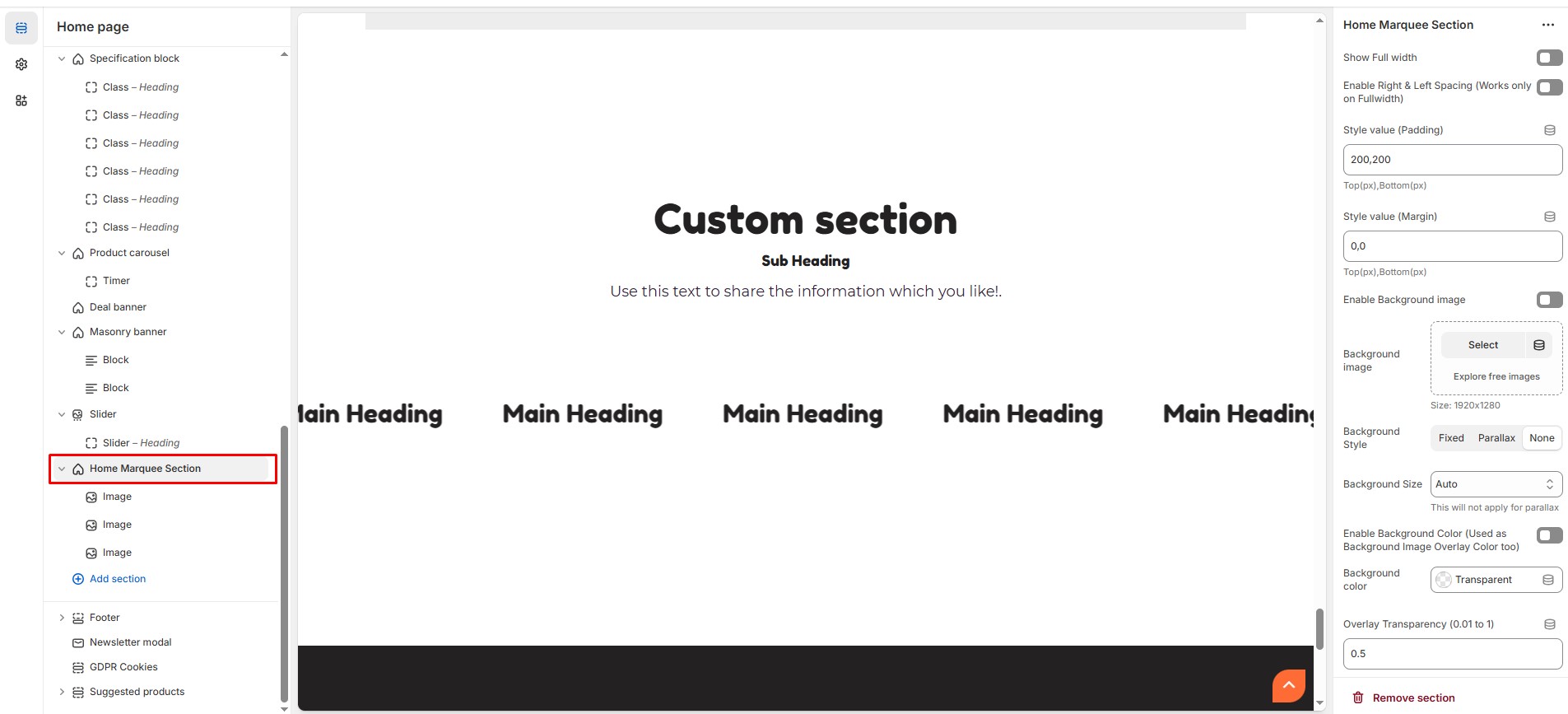
# Home Marquee Section
The **Marquee Section** allows you to create a scrolling text or image effect, making it ideal for **announcements, brand highlights, or promotional messages**.
{% hint style="success" %}
* Go to **Shopify Admin > Online Store > Themes.**
* **Click** Customize on your live theme.
* In the theme editor, **Click** **Add Section > Home Marque Section**.
{% endhint %}
* **Show Full Width:** Expands the marquee section across the entire screen width.
* **Enable Right & Left Spacing (Works only on Fullwidth):** Adds spacing on both sides (works only in Full Width mode).
* **Padding (Top, Bottom):** Adjust the inner spacing above and below the section. Top(px), Bottom(px).
* **Margin (Top, Bottom):** Adjust the outer spacing above and below the section. Top(px), Bottom(px).
* **Enable Background Image:** Allows adding a background image for the section.
* **Background Image:** Upload the image (Recommended size based on design requirements).
* **Background Style:** Choose background style **( Fixed, Parallax, or None )**.
* **Background Size:** Choose background size **( Auto, Cover, Contain, Repeat),** This will not apply for parallax.
* **Enable Background Color:** Enable a background color (also used as an overlay color).
* **Overlay Transparency:** Adjust the transparency of the overlay (value between 0.01 and 1).
* **Main Heading:** Customize the Main heading.
* **Sub Heading:** Add a short text to the content.
* **Description:** Add text to share information about the section.
* **Link Text:** Customize the text for the clickable link.
* **Link URL:** Paste a URL or search for an internal link.
### **Section Color Settings**
* **Heading Color:** Customize the heading color (Set Your Preferred Color).
* **Sub Heading Color:** Customize the sub-heading color (Set Your Preferred Color).
* **Description Color:** Customize the description text color (Set Your Preferred Color).
* **Button Background Color:** Customize the button background color (Set Your Preferred Color).
* **Button Text Color:** Customize the button text color (Set Your Preferred Color).
* **Button Hover Background Color:** Customize the hover background color for button (Set Your Preferred Color).
* **Button Hover Text Color:** Customize the hover text color for button (Set Your Preferred Color).
* **Heading position** : Choose heading position**( Left, Right, Center )**.
### **Content Settings**
* **Column Gap - Leave empty for Default Gap (Units not needed) :** Customize spacing between columns.
* **Layout Style :** Choose the layout style **(Default, Boxed, With seperator).**
* **Animation Speed :** Choose the animation speed **(Slow, Medium, Fast).**
* **Enable Reverse Animation :** Enable or disable reverse animation.
* **Block Background Color :** Customize the block background color (Set Your Preferred Color).
* **Block Content color :** Customize the block content color (Set Your Preferred Color).
### **Additional Settings**
* [**Custom Class:**](https://wdtsupport.gitbook.io/shopify-os/custom-class) The Shopify allows you to apply unique CSS styles to specific sections, blocks, or elements within your theme.
### **Add Block Customization Options**
### **Image**
* **Main Heading :** Customize the main heading
* **Block Image :** Upload the image (Recommended size based on design requirements).
* **Link :** Paste a URL or search for an internal link.
### **Class**
* **Main Heading :** Customize the main heading
* **Font Awesome Class :** Customize the [font awesome class](https://fonts.google.com/icons).
* **Link :** Paste a URL or search for an internal link.